 sprintcourse
Lesson 5 of 30 · 14 min · 7 steps
Day 5. A 15-minute health check for your site
The key idea
Five quick checks
Before deeper work, look for problems that can undermine everything else.
- Indexing. Search for
site:yourdomain.example. Are useful pages present? Do internal search, filter or test pages appear? Treat the operator as an incomplete diagnostic, not an exact count. - robots.txt. Open
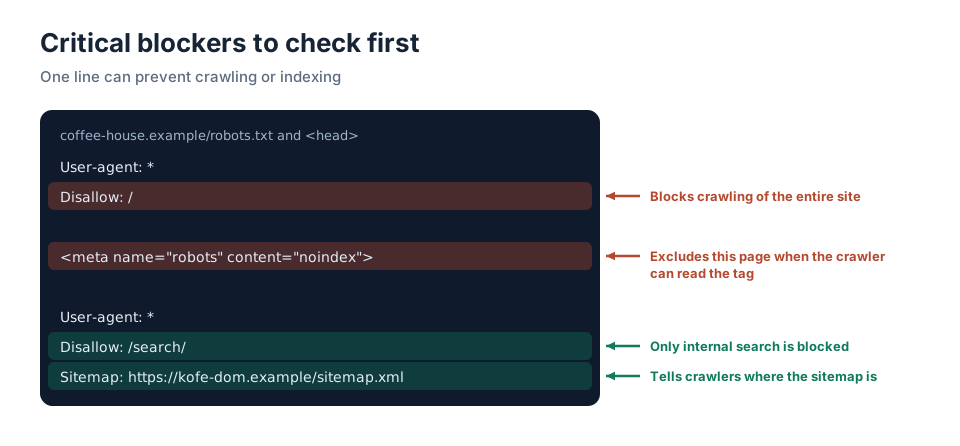
yourdomain.example/robots.txt. A site-wideDisallow: /blocks compliant crawlers, often because staging settings were copied into production. - noindex. View the source of an important page and search for
noindex. It should not exclude a page you want indexed. - HTTPS and host variants. HTTP/HTTPS and www/non-www variants should converge on one preferred URL, ideally in a single permanent redirect.
- Mobile usability and speed. Try your phone and PageSpeed Insights. Is text readable? Do buttons work? Are serious performance problems reported?
Record findings before fixing
Keep a log: problem → location → impact → next step. This preserves findings and makes priorities visible. Module 4 covers technical details.
Critical blockers to check first
A diagnostic log
Record findings in a form you can act on.
Before
Notes lack URLs, impact and next steps. A week later you cannot tell what matters or what was fixed.
After
Every issue has a location, impact and next action, making priorities visible.
How an expert reasons
Prioritize blockers that prevent important pages from being crawled or indexed. Speed and unwanted indexed pages also matter. This log will feed your day-30 plan.
Avoid blind experiments on a live site
Before changing robots.txt, redirects or templates, make a backup and record exactly what changed and when. Test the result. A mistaken crawl or indexing directive can disrupt search visibility.
Check your understanding
Check your understanding
Run the five checks
Run the five checks on your site and record:
Problem | Location | Impact (critical/high/medium/low) | Next step
If you find no problems, record that too: ‘robots.txt checked, no unintended noindex, host variants redirect…’. This is your starting baseline.
Saved automatically, even offline.